Buying or selling a used car? Use our VIN decoder to reveal your vehicle’s make, model, engine type, and any open recalls with verified data from the official NHTSA database.
Enter your 17-digit Vehicle Identification Number (VIN) above to uncover accurate details about your car’s year, trim, engine, and assembly location in seconds.
Our free VIN decoder works with every major brand including Ford, Toyota, Honda, Chevrolet, BMW, Mercedes-Benz, and Jeep, ensuring every lookup is fast, mobile-friendly, and completely reliable.
In This Article:
Where to Find Your VIN
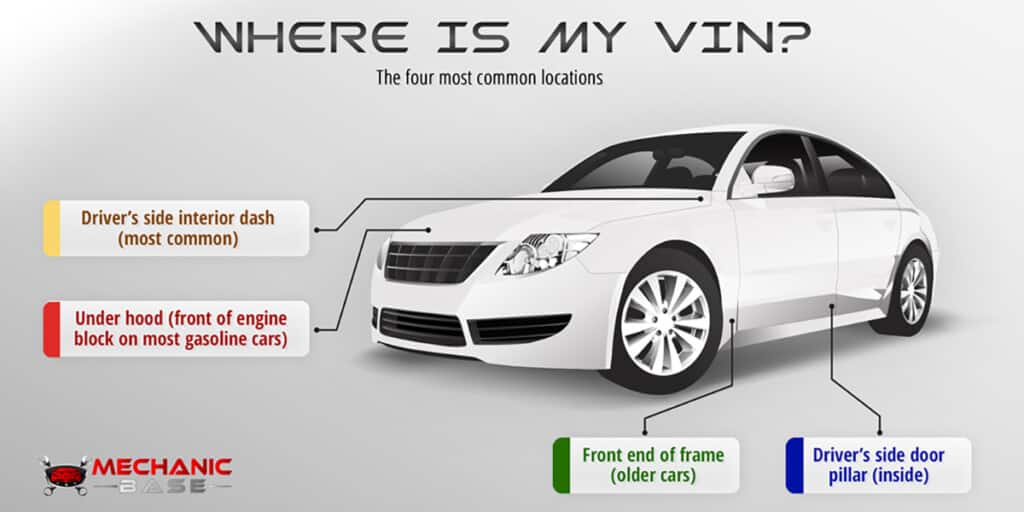
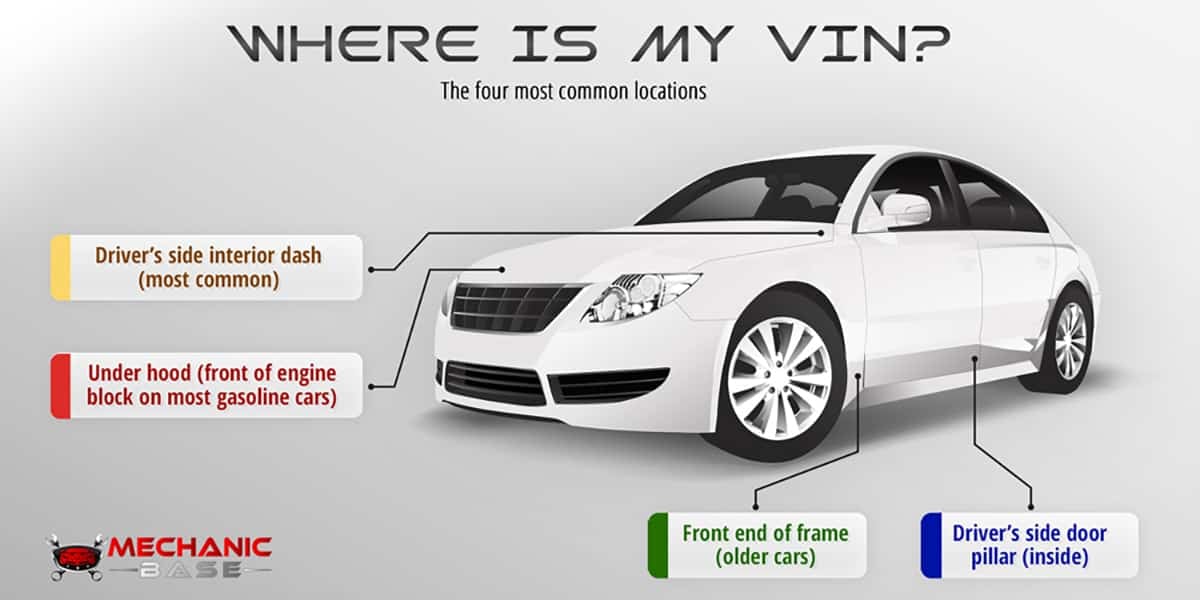
Before you use the VIN decoder, you’ll need to locate your vehicle’s 17-character VIN. It’s printed in a few different places on the car and your paperwork:
- On your registration, title, or insurance documents
- On the driver’s side dashboard, visible through the windshield (most common)
- Inside the driver’s door frame or pillar
- On the front of the engine block under the hood
Once you have the number, enter it above to start your VIN lookup. If you still can’t find it, check out our other article on where to find your car’s VIN.
What Is a VIN Decoder?
Every vehicle has a unique 17-character Vehicle Identification Number, or VIN. It’s like a fingerprint for your car that holds important details about its make, model, and history.
A VIN decoder lets you take that number and unlock valuable information such as where and when the car was built, the engine type, body style, and other factory specs. With a VIN lookup, you can also check for open recalls or verify that the vehicle matches its title and records.
Using a free VIN decoder is a quick and reliable way to confirm a car’s identity before you buy, sell, or register it. It helps you avoid surprises and gives you confidence that you’re getting exactly what you expect.
Why Use Our VIN Decoder
Our free VIN decoder makes it easy to check any vehicle’s details in seconds. Whether you’re buying a used car, verifying your own vehicle, or just curious about its factory specs, this tool gives you fast and accurate results.
- Works with almost all car makes and models
- Data sourced directly from the official NHTSA vPIC database
- No sign-up required and completely free to use
- Fast, mobile-friendly tool that works on any device
- Trusted by thousands of car owners and technicians
What You’ll See When You Decode Your VIN
When you enter your VIN into our free decoder, you’ll instantly see detailed information about your vehicle, including:
- Vehicle make, model, trim, and body style
- Engine size, fuel type, and drivetrain
- Model year and manufacturing plant
- Country of origin
- Vehicle serial number
- Open recalls or production notes
All results are displayed right away, so you can quickly confirm your car’s details without signing up or paying a fee.
How To Decode A VIN
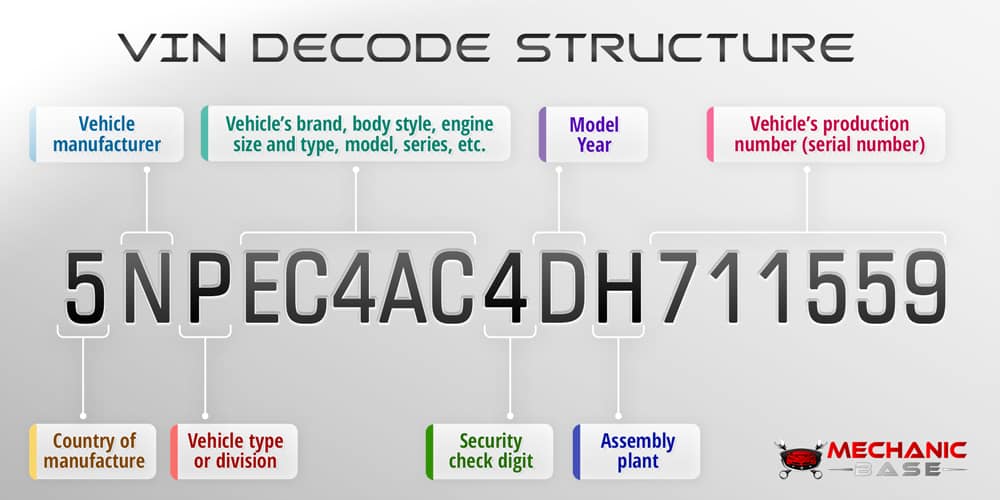
The first three numbers and letters are the vehicle manufacturer. Here are some examples of the largest ones to look for:
1. The First Three Characters: World Manufacturer Identifier (WMI)
| WMI (VIN Prefix) | Manufacturer | Country |
|---|---|---|
| JT, 1NX, 4T | Toyota Motor Corporation | Japan |
| WVW, WV1 | Volkswagen Group | Germany |
| KMH, KMF | Hyundai Motor Group | South Korea |
| VF1, ZFA, 1C4 | Stellantis N.V. (Fiat, Peugeot, Chrysler, etc.) | Multinational (HQ Netherlands) |
| 1G1, 2G1 | General Motors (Chevrolet, GMC, Cadillac) | USA |
| 1F, 3F | Ford Motor Company | USA |
| JHM, 1HG | Honda Motor Co., Ltd. | Japan |
| JN1, JN8 | Nissan Motor Corporation | Japan |
| JS | Suzuki Motor Corporation | Japan |
| WBA, WBS | BMW Group | Germany |
| WDB, WDD | Mercedes-Benz Group | Germany |
| VF1 | Renault Group | France |
| 5YJ, 7SA | Tesla, Inc. | USA |
| LGX, LFB | BYD Auto | China |
| LSY | Geely Auto | China |
| LFS, LZW | Changan Automobile | China |
| JMZ, 1YV | Mazda Motor Corporation | Japan |
| JMA, JMB | Mitsubishi Motors Corporation | Japan |
| KNA, KNM | Kia Corporation | South Korea |
| YV1, YV4 | Volvo Cars | Sweden |
2. Characters 4 to 8: Vehicle Descriptor Section (VDS)
This part describes the vehicle type, model, body style, engine type, and transmission. Manufacturers use these digits to encode key specs. For example, a “4T1BE32K” in a Toyota VIN could mean a midsize sedan with a specific engine option.
3. The 9th Character: Check Digit
This is a special number used to verify that the VIN is valid. It’s calculated with a formula that detects common typos or fraudulent VINs.
4. Characters 10 to 17: Vehicle Identifier Section (VIS)
These digits identify the specific vehicle and include the model year, manufacturing plant, and the serial number. For example, the 10th character shows the model year – “A” for 1980, “B” for 1981, and so on.
5. Putting It All Together
When you enter your VIN into our free decoder, we automatically read each section to display detailed information about your vehicle, including brand, model, engine, assembly plant, and production year. It’s the fastest way to confirm your car’s identity before buying, selling, or registering it.
VIN Decoder vs. Vehicle History Check
A VIN decoder focuses on vehicle specifications, what was built at the factory.
A Vehicle History check, on the other hand, looks at the vehicle’s history, including ownership, title status, odometer readings, and any reported accidents.
Using both can help you make smarter decisions when buying or selling a car.
| Feature | VIN Decoder | Vehicle History Check |
|---|---|---|
| Main Purpose | Reveals manufacturer details and vehicle specifications from the VIN structure. | Shows the vehicle’s past, including accidents, title issues, mileage, and ownership records. |
| Data Source | Manufacturer codes and global VIN standards (WMI, VDS, VIS). | Official databases, insurance companies, DMVs, and repair records. |
| Information Provided | Brand, model, body type, engine type, transmission, assembly plant, production year. | Accident history, service records, odometer readings, recalls, registration data. |
| Cost | Usually free. | Often paid – depends on provider and report depth. |
| When to Use | To identify what a VIN belongs to or confirm manufacturer details. | Before buying or selling a used car to check for hidden problems or fraud. |
Frequently Asked Questions About Our VIN Decoder
Yes. Our VIN decoder is free to use for all vehicles built after 1981.
Absolutely, you can use our vin decoder for almost any car manufacturer. It supports Ford, Toyota, Honda, BMW, Chevy, Mercedes, and nearly every global brand.
If your VIN isn’t 17 characters long, it’s most likely because you have an older vehicle. Vehicles made before 1981 used shorter VINs that don’t follow today’s standard format.
VINs never include the letters I, O, or Q to avoid confusion – those are always zeros or ones.
Information comes directly from the NHTSA Vehicle Product Information Catalog (vPIC) and manufacturer submissions.
Official Data Source
Data powered by the NHTSA Vehicle Product Information Catalog (vPIC).